












Adobe Photoshop Elements 2026

Trusted Shops
Buyer Protection guaranteed refund
Original License Guaranteed by Licensel.com
| Language | Italian, Multi-Language |
|---|---|
| License Duration | 3 years |
| Operating System | Windows and macOS |
| Users | 1 user, 2 devices |
Adobe Photoshop Elements 2026 is the photo editing software for anyone who wants professional results without facing the complexity of Photoshop. The guided edits walk you step by step through operations such as removing an object, replacing a background or fixing the light, while the automatic tools based on artificial intelligence handle the most technical work on their own. It is the choice of families, photography enthusiasts and small businesses that manage images themselves. The three-year license is delivered with its product key.
Why choose Adobe Photoshop Elements 2026
Photoshop Elements solves a concrete problem: most people need a few recurring operations on their photos, not the whole Photoshop arsenal. Fixing a dark photo, straightening a crooked horizon, removing an unwanted person in the background, combining several shots into a collage: here these tasks are performed through guided procedures that explain every step, with no need to learn layers and masks.
Compared with Photoshop on subscription, Elements costs markedly less, comes with a three-year license and has an interface designed for people who are not graphic designers by trade. Anyone needing complex compositing, advanced colour management or integration with the other Adobe programs should choose full Photoshop; for everything else Elements amply covers everyday needs.
What Adobe Photoshop Elements 2026 is and what it is for
Photoshop Elements 2026 consists of two parts that work together: the Organizer, which gathers and catalogues the archive by automatically recognising faces, places and events, and the Editor, where you work on individual images in three modes, from the most automatic to the most manual.
The working modes are designed to grow with the user: quick mode applies immediate corrections with a few sliders, guided mode offers more than fifty step-by-step procedures for specific effects, while expert mode provides layers, masks and filters for anyone wanting full control. The result is exported for the web, for print or for ready-made creations such as collages, cards and calendars.
Key features
- Step-by-step guided edits
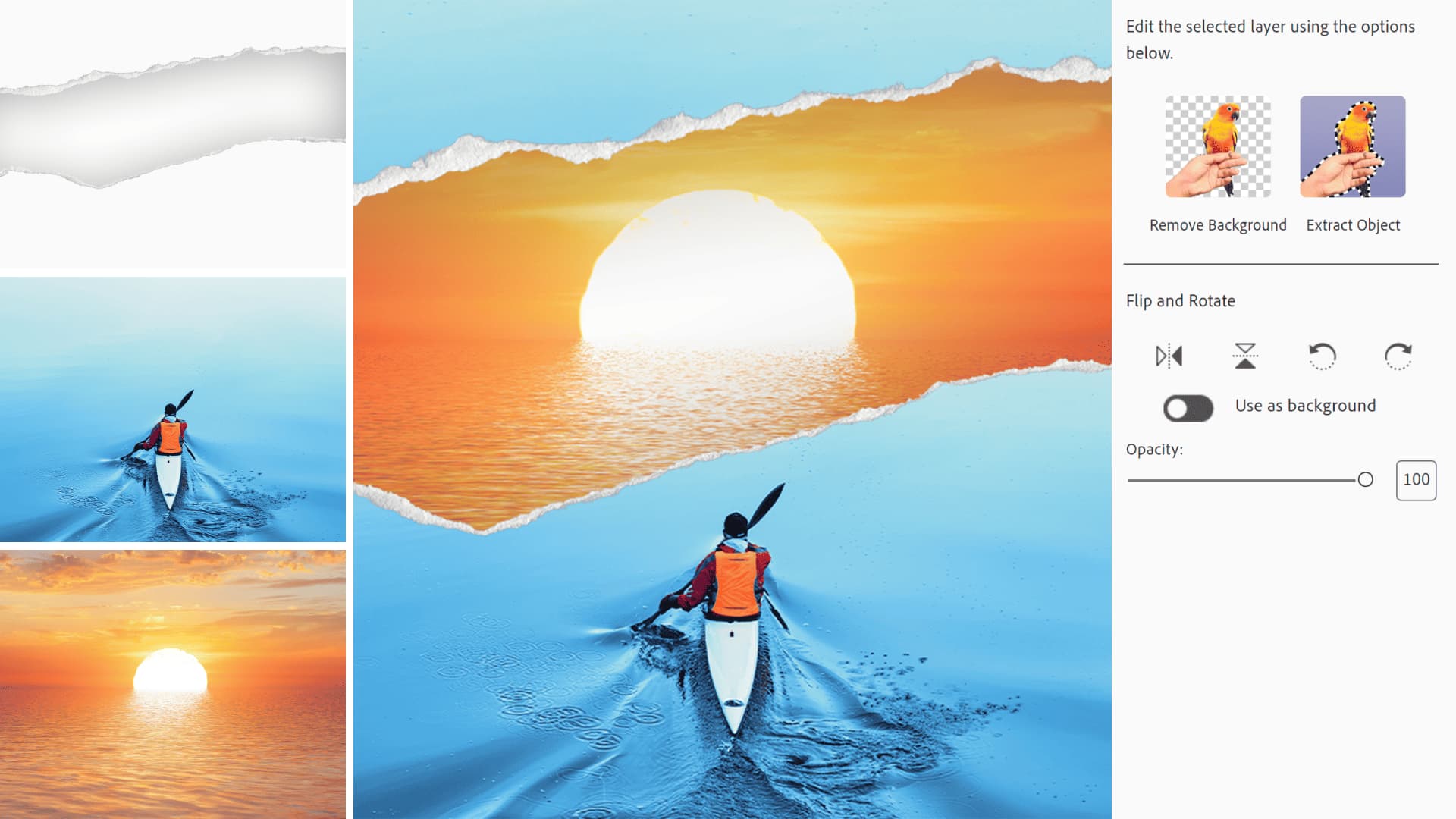
More than fifty procedures explaining every step to achieve a specific effect, from background replacement to creating a double exposure. - Automatic subject selection
One click isolates a person, animal or object from the background, with automatic edge refinement even on hair and complex details. - Removal of unwanted objects
Delete passers-by, power lines or blemishes while the background is automatically rebuilt convincingly. - Automatic light and colour correction
Exposure, contrast, saturation and white balance fixed automatically, with the option to intervene manually. - Organizer with automatic recognition
The archive sorts itself by faces, places and events, so you find photos of a person or a holiday without having tagged anything. - Ready-to-use creations
Collages, cards, calendars and slideshows with prepared templates, ready to print or share. - Expert mode with layers and masks
For anyone wanting full control, layers, masks, filters and selective adjustments remain available. - High quality export and printing
Multiple formats, resizing and colour profiles for photographic printing or online publishing.
Feature overview of Adobe Photoshop Elements 2026
| Feature | Available |
|---|---|
| Step-by-step guided edits | ✔ |
| Automatic subject selection | ✔ |
| Removal of objects and people | ✔ |
| Automatic exposure and colour correction | ✔ |
| Organizer with face and place recognition | ✔ |
| Collages, calendars and ready-made creations | ✔ |
| Layers, masks and filters | ✔ |
| High quality export and printing | ✔ |
Comparison: Photoshop Elements vs Premiere Elements
| Area | Photoshop Elements | Premiere Elements |
|---|---|---|
| Photo retouching and image correction | ✔ | ✘ |
| Video editing and transitions | ✘ | ✔ |
| Shared Organizer for photos and videos | ✔ | ✔ |
| Step-by-step guided edits | ✔ | ✔ |
| Automatic AI tools | ✔ | ✔ |
| Collages, compositions and prints | ✔ | ✘ |
| Audio correction and soundtrack | ✘ | ✔ |
| License | 3 years | 3 years |
System requirements
Adobe Photoshop Elements 2026 is compatible with Windows 10, Windows 11 and macOS. For compatibility with your macOS version and the detailed requirements, see the "Requirements" tab on the product page.
Why are licenses priced so low?
As these are retail licenses previously owned and decommissioned by the former holder in accordance with EU Court ruling C-128/2011, they can be purchased at a more affordable price. These official licenses are fully compliant and guaranteed at the best price on the market.
What do I receive after purchase?
By purchasing this product you will receive the official download of the software from the Adobe website, the license for activation and complete instructions for a correct installation.
Advantages of the Licensel License
- Fast delivery by email
You receive the license and the download link within a few minutes of your order. - Always free support
Our technicians assist you via Live Chat and email, at no additional cost. - Invoice included
The invoice is issued automatically once the purchase is complete. - Trusted Shops partner shop
The official Trusted Shops guarantee protects every purchase made on Licensel.
How to buy and activate
- Choose your edition
Select the version you need and complete your order in a few clicks. - Receive the license by email
Within a few minutes you receive the official download link and the license for activation. - Install and activate
Download the software from the manufacturer's official website and enter the license to complete activation. - Support included
For any question our technicians are available via Live Chat and email.
How to download and install Adobe Photoshop Elements 2026
The download takes place from the official Adobe website through the link you receive by email. Download the package for your operating system, start the installation and follow the wizard: on first launch the program asks for the license you received to complete activation. The operation takes a few minutes. If you prefer to be guided step by step, our technicians can assist you during installation.
Need help with installation?
No problem: our technicians are available via the Live Chat at the bottom right of the website to assist you in real time.
Frequently asked questions
What is the difference between Photoshop Elements and Photoshop?
Is the license perpetual or time limited?
Do I need photo editing experience to use it?
Where do I find the product key?
Does it work on both Windows and Mac?
DIGITAL Delivery
Guaranteed instant delivery
Customer Support
Always available.
Money-back guarantee
Total satisfaction guarantee.
TrustedShops
Buy with certified confidence.





















